Friday, January 21, 2011

Is that a Pico Projector Portfolio in you Pocket?

Last summer we were all pretty underwhelmed with the AAXA pico-projector model that we purchased. Mostly due to the low output and a very limited battery life.

At EDUCAUSE 2010 in Anaheim we got some hands-on time with these two models by Optoma. They each seemed a lot more promising, take a look at the reviews linked.


Optoma PK301 Pico Pocket Projector
            http://www.pcmag.com/article2/0,2817,2363052,00.asp?tab=FullReview
           http://www.projectorcentral.com/Optoma-Pico_PK301.htm


 Optoma PK201 Pico Pocket Projector
            http://www.projectorcentral.com/Optoma-Pico_PK201.htm
            http://www.projectorcentral.com/optoma_PK201_pico_projector_review.htm


There's also a small sized "Portfolio" carrying case that has a built in 15.5" " diagonal Projector Screen 
Dimensions 14.25" x 2" x 10.75"
Weight 2.2 lbs

Part #BK-PK30DF
UPC Code:796435 09 010 4
  • Project images of up to 15.5" diagonal onto built-in matte white screen
  • Includes convenient mini tripod
  •  Store and protect your Pico projector in the dedicated pocket
  • Separate accessories pocket for Pico projector essentials
  • Transport your netbook and important documents in the expandable sleeve
  • Sleek design in black leatherette


I'd also suggest picking up an HDMI To Mini HDMI + Mini HDMI To Mini HDMI Cable 1m) for the PK201 and PK301 Part #BC-PK3AHMK  ( http://www.amazon.comOptoma-BC-PK3AHMK-Cable-PK201-PK301/dp/tech-data/B003F8Q6SE )

The vendor's Pico Projector site gives lots more good specs & details: http://www.optomausa.com/pico.asp

Wednesday, December 22, 2010

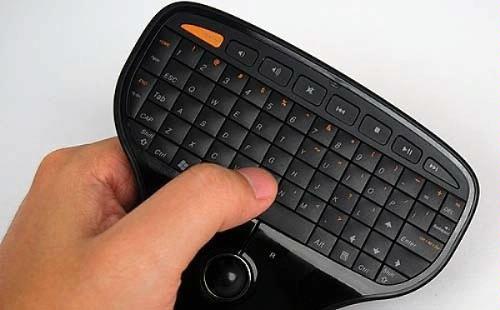
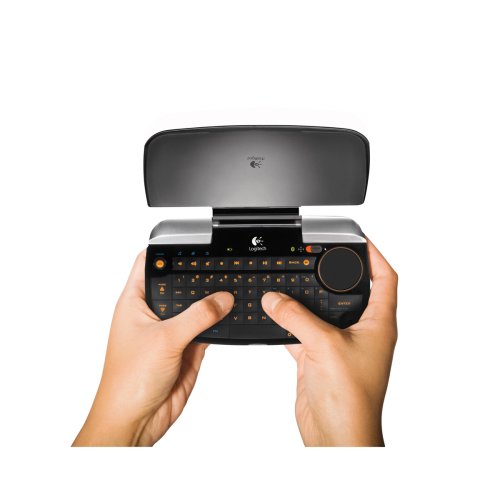
palm-sized wireless mouse & keyboard combination device(s)

A palm sized wireless mouse & keyboard combination would be great not only for our smart classroom instructor podiums, but also to accompany the large-ish "viewing screens" such as the one recently installed in Special Collections.

The following are three devices I've researched that may meet our needs:


Friday, October 1, 2010

Bluetooth Cordless Handheld Barcode Scanners for mobile inventory

This wireless handheld scanner would help to improve our roaming inventory process as well as the check in of new items. When connected to a mobile device, barcodes could be scanned directly into a web-based app or stored locally in a spreadsheet file for later transfer/upload to the inventory system.

Socket Mobile CHS Series 7  Bluetooth Cordless Handheld Barcode Scanners work with:
iPhone iOS 4, iPad, Blackberry, Palm, Windows Mobile, tabletPC and Windows7


Socket Mobile 7XRx iPad Demo  http://www.youtube.com/watch?v=eZqb99pAbEc


Socket Mobile iPhone iOS4 Demo http://www.youtube.com/watch?v=ImI_oqXICGk


They have several different models and features.
http://ww1.socketmobile.com/products/bluetooth-scanners.aspx

CDW carries models in $300-$500 range:
Socket Bluetooth Cordless Hand Scanner 7E - barcode scanner
Barcode scanner - handheld - 100 scan / sec - decoded - Bluetooth 2.1 EDR
MFG #: CX2858-1294   |   CDW #: 2190560
 Socket Mobile also makes PDA handhelds with fully integrated scanners & wifi that run WindowsMobile... http://www.socketmobile.com/products/


Thursday, December 17, 2009

Squirrel Mail becomes Nuts Mail

During December 2009, IDT is having the ROHAN server run Nuts Mail along side Squirrel Mail. This option is to give users a chance to test out the new version. IDT is switching ROHAN to Nuts Mail for the Spring 2010 semester and will turn off Squirrel Mail at the same time.

The switch will provide IDT with an easier way to manage the mail service updates, as well as give users some updated features and a modern interface. New features include the following options: To Do List, Notes, Bookmarks, and Calendar, as well as Help, Search, and Logout as small icons in the upper right corner of the screen.

Nuts Mail will use the same preferences users had saved in Squirrel Mail. However some stylesheets have changed colors, so be sure to go into Options > Display Preferences > and test out new Themes and Custom Stylesheets.

Wednesday, October 7, 2009

Problem with SSH Sessions on ROHAN

ROHAN is seeing TCP packet losses that are sometimes affecting SSH sessions causing the "keepalive" packets to be lost. This causes ROHAN to think the SSH client has gone away and ROHAN then closes the session.

TNS is able to duplicate the problem (ping packet losses and SSH sessions closing) and is investigating. Please let others know we are trying to solve this aggravating problem and thank you for your patience.

@SDSULibTech on Twitter