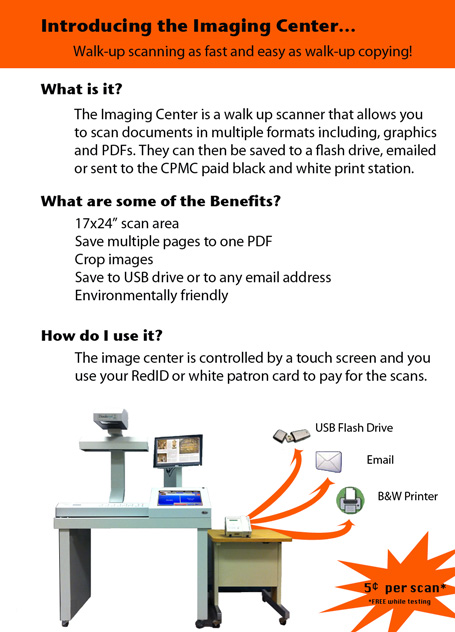
The Bookeye Knowledge Imaging Center (KICII) is a complete walk-up color digitization system for scanning excerpts from books and other materials, up to 24 x 17 inches. The system uses a super fast high quality image scanner that can even perform Optical Character recognition. Using a touch-screen, users have the option of saving their scans to their USB drive, sending their scans to their email account, or sending their scans to any paid printer.
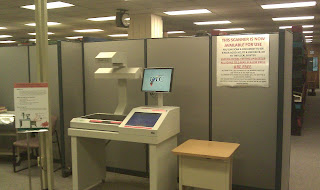
Bookeye Scanning devices. Some are in staff only areas, such as InterLibrary Loan or Special Collections & University Archives. The vendor site shows complete product line offerings including wide-format, flatbed and overhead models. http://imageaccess.com
KIC units provide an integrated Hardware & Software solution for rapid scanning and electronic delivery. We have been fairly impressed with the performance and ease of use both from a setup and administration standpoint as well as end user support experience. See the product page ( http://www.dlsg.net/kic.html ) for specs, use case and video demos.
A webspace for dissemination of information on current digital technology initiatives being pursued by Library Information Technology and Digital Initiatives (LIT&DI) Division at SDSU Library.
Wednesday, May 4, 2011
Monday, May 2, 2011
LA 76 & 78 Classroom PCs Print to GoPrint Paystations in Media, Reference & CPMC
Students using LA-76 and 78 can print to the Library’s GoPrint system from any classroom computer.
Print requests show up at GoPrint Paystations in Media, Reference and CPMC. Jobs are displayed by the computer name/number (i.e. LA76-1 or LA78-001) labeled on each.
In LA-76, users can tilt the Notebook screen to see the label.
In LA-78. the the label is below the iMac screen on the left.
The closest Library GoPrint Paystation to the classrooms is in the Media Center, but Reference and CPMC can be used to call up and complete the print request using the classroom computer's labeled number.
Print requests show up at GoPrint Paystations in Media, Reference and CPMC. Jobs are displayed by the computer name/number (i.e. LA76-1 or LA78-001) labeled on each.
In LA-76, users can tilt the Notebook screen to see the label.
In LA-78. the the label is below the iMac screen on the left.
The closest Library GoPrint Paystation to the classrooms is in the Media Center, but Reference and CPMC can be used to call up and complete the print request using the classroom computer's labeled number.
Prezi: A Free Alternative to PowerPoint - Create game-changing presentations online.
Prezi is free and completely web-based presentation tool, meaning it can be used to create and view presentations without installing anything.
Academic users can sign up for a free educationally licensed account using an e-mail address ending in .edu at http://prezi.com/profile/signup/edu/
There are several Prezi tutorials available to help first-time users get get started at http://prezi.com/learn/
View a quick video: GettingStarted: Prezi in 3 minutes
Academic users can sign up for a free educationally licensed account using an e-mail address ending in .edu at http://prezi.com/profile/signup/edu/
There are several Prezi tutorials available to help first-time users get get started at http://prezi.com/learn/
View a quick video: GettingStarted: Prezi in 3 minutes
Next Gen Development for Millennium
III announced the next generation of development for Millennium at the recent Innovative Users Group Conference. The Sierra Services Platform features a modern programming architecture including a fully relational database. Review yesterday’s press release @ http://iii.com for details.
The new platform includes a new integrated client which will provide full Millennium functionality upon migration (unlike Millennium, in which modules were introduced in successive releases). The client employs a single pull-down menu to access functions rather than the current complex assortment of modules and modes assigned by a user login. III emphasized that this is not a new product but a move to a sustainable architecture to improve continuing development.
MatLab Upgraded on ROHAN
Rohan has upgraded the Matlab license file from R2010b to R2011a.
Matlab R2011a can be downloaded from http://rohan.sdsu.edu/iso for on
campus computers.
Matlab R2011a can be downloaded from http://rohan.sdsu.edu/iso for on
campus computers.
Subscribe to:
Comments (Atom)