III announced the next generation of development for Millennium at the recent Innovative Users Group Conference. The Sierra Services Platform features a modern programming architecture including a fully relational database. Review yesterday’s press release @ http://iii.com for details.
The new platform includes a new integrated client which will provide full Millennium functionality upon migration (unlike Millennium, in which modules were introduced in successive releases). The client employs a single pull-down menu to access functions rather than the current complex assortment of modules and modes assigned by a user login. III emphasized that this is not a new product but a move to a sustainable architecture to improve continuing development.
Monday, May 2, 2011


MatLab Upgraded on ROHAN
Rohan has upgraded the Matlab license file from R2010b to R2011a.
Matlab R2011a can be downloaded from http://rohan.sdsu.edu/iso for on
campus computers.
Matlab R2011a can be downloaded from http://rohan.sdsu.edu/iso for on
campus computers.
Wednesday, April 27, 2011
Pickin' your seat @SDSULibrary ? Get the Electric Chair!

These new chairs were recently installed in several locations throughout the Love Library building.
In addition to being comfy leather seats with a rotating desktop space perfect for writing or typing, they also have a convenient pop-out module with an electric plug at just the right height.
Use the outlet to feed all your power hungry gadgets.
Sure beats plopping down on the floor next to a random wall outlet!
Friday, January 21, 2011
Is that a Pico Projector Portfolio in you Pocket?
Last summer we were all pretty underwhelmed with the AAXA pico-projector model that we purchased. Mostly due to the low output and a very limited battery life.
At EDUCAUSE 2010 in Anaheim we got some hands-on time with these two models by Optoma. They each seemed a lot more promising, take a look at the reviews linked.

Optoma PK301 Pico Pocket Projector
http://www.pcmag.com/article2/0,2817,2363052,00.asp?tab=FullReview
http://www.projectorcentral.com/Optoma-Pico_PK301.htm
 Optoma PK201 Pico Pocket Projector
http://www.projectorcentral.com/Optoma-Pico_PK201.htm
http://www.projectorcentral.com/optoma_PK201_pico_projector_review.htm
There's also a small sized "Portfolio" carrying case that has a built in 15.5" " diagonal Projector Screen
I'd also suggest picking up an HDMI To Mini HDMI + Mini HDMI To Mini HDMI Cable 1m) for the PK201 and PK301 Part #BC-PK3AHMK ( http://www.amazon.comOptoma-BC-PK3AHMK-Cable-PK201-PK301/dp/tech-data/B003F8Q6SE )
The vendor's Pico Projector site gives lots more good specs & details: http://www.optomausa.com/pico.asp
At EDUCAUSE 2010 in Anaheim we got some hands-on time with these two models by Optoma. They each seemed a lot more promising, take a look at the reviews linked.

Optoma PK301 Pico Pocket Projector
http://www.pcmag.com/article2/0,2817,2363052,00.asp?tab=FullReview
http://www.projectorcentral.com/Optoma-Pico_PK301.htm

http://www.projectorcentral.com/Optoma-Pico_PK201.htm
http://www.projectorcentral.com/optoma_PK201_pico_projector_review.htm
There's also a small sized "Portfolio" carrying case that has a built in 15.5" " diagonal Projector Screen
 |
| Dimensions 14.25" x 2" x 10.75" Weight 2.2 lbs Part #BK-PK30DF UPC Code:796435 09 010 4 |
- Project images of up to 15.5" diagonal onto built-in matte white screen
- Includes convenient mini tripod
- Store and protect your Pico projector in the dedicated pocket
- Separate accessories pocket for Pico projector essentials
- Transport your netbook and important documents in the expandable sleeve
- Sleek design in black leatherette
I'd also suggest picking up an HDMI To Mini HDMI + Mini HDMI To Mini HDMI Cable 1m) for the PK201 and PK301 Part #BC-PK3AHMK ( http://www.amazon.comOptoma-BC-PK3AHMK-Cable-PK201-PK301/dp/tech-data/B003F8Q6SE )
The vendor's Pico Projector site gives lots more good specs & details: http://www.optomausa.com/pico.asp
Wednesday, December 22, 2010
palm-sized wireless mouse & keyboard combination device(s)
A palm sized wireless mouse & keyboard combination would be great not only for our smart classroom instructor podiums, but also to accompany the large-ish "viewing screens" such as the one recently installed in Special Collections.
The following are three devices I've researched that may meet our needs:

- ProMini Wireless Keyboard with Trackpad - either bluetooth or traditional 2.4ghz wireless
$46.00 on Amazon: http://www.amazon.com/2-4GHz-Wireless-Keyboard-TouchPad-Pointer/dp/B003I60MBU
$69.00 on ThinkGeek: http://www.thinkgeek.com/computing/keyboards-mice/e0e7/
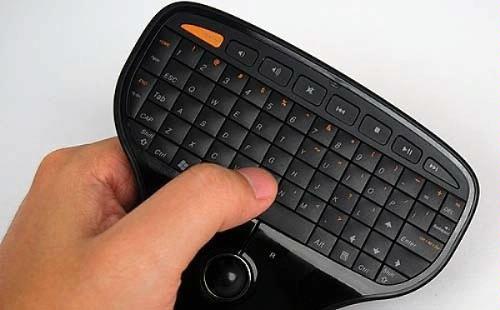
- Lenovo Multimedia Remote with Keyboard - 2.4ghz wireless
I had some hands on @ EduCAUSE in Anahiem, but not great reviews online.
$46.00 http://www.amazon.com/Lenovo-Multimedia-Remote-with-Keyboard/dp/B0036VO67I/ref=pd_sim_e_4
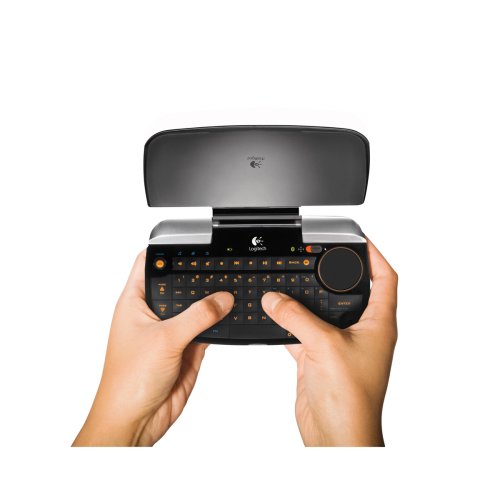
Logitech diNovo Mini - bluetooth only
$115.00 http://www.amazon.com/Logitech-920-000594-diNovo-Mini/dp/B0011FOOI2/ref=pd_cp_e_3
Subscribe to:
Comments (Atom)