Tuesday, May 17, 2011

PachyDerm now running in the Library

PachyDerm is a browser based authoring platform designed for people with little multimedia experience. The tool is accessed through a web browser and is as easy to use as filling out a web form. Authors upload their own media (images, audio clips, and short video segments) and place them into pre-designed templates, which can play video and audio, link to other templates, zoom in on images, and more.

Once the templates have been completed and linked together, the presentation is published and can then be downloaded and placed on a website or CD-DVD.

The result is an attractive, interactive flash-based multimedia presentation.


SCUA is using it to develop presentations using pre-determined templates for their collections. Their patrons then can access these presentation via links on SCUA’s website. PachyDerm has already been used to author Online Exhibits such as:
Unidos Por La Causa: The Chicana and Chicano Experience in San Diego
available in English
y también disponible en español.


IDT has setup this web tool on our server named pachyderm.lib.sdsu.edu.

Pachyderm is an open source software project supported in part by the California State University Center for Distributed Learning. More info on the project is available at http://www.pachyforge.org

Watch a 7 minute introductory video on Pachyderm 2.1, part of a Free Online Video Training Series of 15 short videos covering basic to advanced topics.

Tuesday, May 10, 2011

WYSE demise! PAC Terminals Green Screens Upgraded to PCs

The Library has replaced the +25 year old green screen Public PAC Wyse Terminals with re-purposed Gateway computers. In short, the reason for the switch - the text-based search used by the terminals is not supported in the next release of the PAC software and maintaining the aged serial device network, PACNET is a pain.

Patrons can now enjoy familiar web-based searching and Library IT staff have much easier methods of managing the hardware/software.


(looks vaguely familiar. Is this Gopher?)
What happened to the PAC Plus (WYSE) terminals?
You may have noticed that the old “PAC Plus” green screen terminals with their ancient, text-menus have been replaced throughout the library with new PC workstations displaying a simplified version of WebPAC (hmm, looks familiar, but something is missing…).


This was the culmination of a number of factors:
  1. III announced last summer that they would no longer support text-based public interfaces in their next major release (expected this summer) so the clock began tick, tick, tocking.
  2. The technology supporting the WYSE terminals and connecting them to PAC (via PACnet) was circa early 90’s (and had the cobwebs to prove it!). [I know, doesn’t seem that long ago, but in the IT world this is like comparing a stylus and clay to a ball point pen and paper, or perhaps an IPAD]
  3. Students are genuinely stymied when presented with a simple text menu with 4, single-letter commands (um, looks hard. Where’s the mouse?).
  4. We were still paying a little over $200/yr in maintenance for a customizable, public, text-menu (“PAC Plus”) although the software hadn’t been improved since the ‘90s. In fact, the text-interface had gradually lost functionality over the past several releases. INN-Reach Pass-thru searching (to LINK+ & Circuit) was lost after a change in access protocol in Release 2008 and patron holds could no longer be placed in Release 2009.
 So, the writing was on the wall, and while it would have been simpler to just re-use the PC image deployed on the public Reference workstations, point them at Infodome and leave it at that, there was still a need to provide a means to look up call numbers (for books) in the book stacks where most of this kind of activity often occurs.

Firefox was also essentially placed in a straightjacket and
a number of features ‘external’ to WebPAC such as ILL,
Infoguides, the Periodical Title search , etc. were suppressed
using some added coding and a local stylesheet.

Luckily, we were able to draw on the IDT brain pool (for a tasty punch - add 2 Brians, 1 Dennis, 1 Keven, 1 Kyle & 1 Steve – stir liberally with 1 Mark) in coming up with a simple, manageable (mostly pain-free) solution which was quickly deployed (really quickly – like 2 months.
We had a working prototype in November and the final version by December) by Juan and Steve Voelker.


 So, how did we do it? (or why? – see above)
In order to thwart patrons basically camping out on these PCs perusing e-resources (or CNN) while others desperately foraged in the stacks, WebPAC was selected as the starting point instead of Infodome.
So far it seems to be working pretty well.

Benefits:
Patrons aren’t finding their way out away from the catalog to aimlessly wander the World Wide Interwebs and Inhouse PAC searches are up 260% Jan-Apr 2011 compared to last year.

Ironically, the PCs will soon be replaced with a new type of ThinClient, that will provide a full Windows browser experience but allow for easier centralized management and configuration... we've come full circle!

Wednesday, May 4, 2011

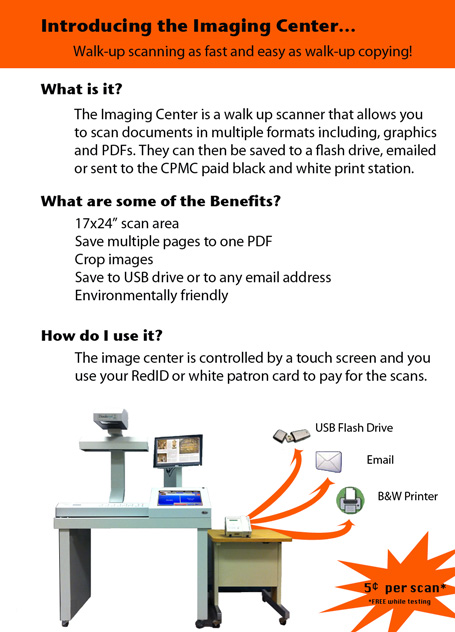
KICII Walk-up Color Scanning Now Available @SDSULibrary

The Bookeye Knowledge Imaging Center (KICII) is a complete walk-up color digitization system for scanning excerpts from books and other materials, up to 24 x 17 inches. The system uses a super fast high quality image scanner that can even perform Optical Character recognition. Using a touch-screen, users have the option of saving their scans to their USB drive, sending their scans to their email account, or sending their scans to any paid printer.

A KIC II scanner is available for patron use
Located outside of Copy Service on the
1st floor of Love Library Room LL-126.

For a limited time the service is free
there after scans will cost $0.05 per page saved
charged to your SDSU RedID or Guest Card
Library owns a number of very high quality Bookeye Scanning devices. Some are in staff only areas, such as InterLibrary Loan or Special Collections & University Archives. The vendor site shows complete product line offerings including wide-format, flatbed and overhead models. http://imageaccess.com

KIC units provide an integrated Hardware & Software solution for rapid scanning and electronic delivery. We have been fairly impressed with the performance and ease of use both from a setup and administration standpoint as well as end user support experience. See the product page ( http://www.dlsg.net/kic.html ) for specs, use case and video demos.


Monday, May 2, 2011

LA 76 & 78 Classroom PCs Print to GoPrint Paystations in Media, Reference & CPMC

Students using LA-76 and 78 can print to the Library’s GoPrint system from any classroom computer.

Print requests show up at GoPrint Paystations in Media, Reference and CPMC. Jobs are displayed by the computer name/number (i.e. LA76-1 or LA78-001) labeled on each.

In LA-76, users can tilt the Notebook screen to see the label.
In LA-78. the the label is below the iMac screen on the left.

The closest Library GoPrint Paystation to the classrooms is in the Media Center, but Reference and CPMC can be used to call up and complete the print request using the classroom computer's labeled number.

Prezi: A Free Alternative to PowerPoint - Create game-changing presentations online.

Prezi is free and completely web-based presentation tool, meaning it can be used to create and view presentations without installing anything.

Academic users can sign up for a free educationally licensed account using an e-mail address ending in .edu at http://prezi.com/profile/signup/edu/

There are several Prezi tutorials available to help first-time users get get started at  http://prezi.com/learn/


View a quick video: GettingStarted: Prezi in 3 minutes

Next Gen Development for Millennium

III announced the next generation of development for Millennium at the recent Innovative Users Group Conference. The Sierra Services Platform features a modern programming architecture including a fully relational database. Review yesterday’s press release @ http://iii.com for details.

The new platform includes a new integrated client which will provide full Millennium functionality upon migration (unlike Millennium, in which modules were introduced in successive releases). The client employs a single pull-down menu to access functions rather than the current complex assortment of modules and modes assigned by a user login. III emphasized that this is not a new product but a move to a sustainable architecture to improve continuing development.

MatLab Upgraded on ROHAN

Rohan has upgraded the Matlab license file from R2010b to R2011a.

Matlab R2011a can be downloaded from http://rohan.sdsu.edu/iso for on
campus computers.

Wednesday, April 27, 2011

Pickin' your seat @SDSULibrary ? Get the Electric Chair!


These new chairs were recently installed in several locations throughout the Love Library building. 
In addition to being comfy leather seats with a rotating desktop space perfect for writing or typing, they also have a convenient pop-out module with an electric plug at just the right height. 
Use the outlet to feed all your power hungry gadgets.
Sure beats plopping down on the floor next to a random wall outlet!

Friday, January 21, 2011

Is that a Pico Projector Portfolio in you Pocket?

Last summer we were all pretty underwhelmed with the AAXA pico-projector model that we purchased. Mostly due to the low output and a very limited battery life.

At EDUCAUSE 2010 in Anaheim we got some hands-on time with these two models by Optoma. They each seemed a lot more promising, take a look at the reviews linked.


Optoma PK301 Pico Pocket Projector
            http://www.pcmag.com/article2/0,2817,2363052,00.asp?tab=FullReview
           http://www.projectorcentral.com/Optoma-Pico_PK301.htm


 Optoma PK201 Pico Pocket Projector
            http://www.projectorcentral.com/Optoma-Pico_PK201.htm
            http://www.projectorcentral.com/optoma_PK201_pico_projector_review.htm


There's also a small sized "Portfolio" carrying case that has a built in 15.5" " diagonal Projector Screen 
Dimensions 14.25" x 2" x 10.75"
Weight 2.2 lbs

Part #BK-PK30DF
UPC Code:796435 09 010 4
  • Project images of up to 15.5" diagonal onto built-in matte white screen
  • Includes convenient mini tripod
  •  Store and protect your Pico projector in the dedicated pocket
  • Separate accessories pocket for Pico projector essentials
  • Transport your netbook and important documents in the expandable sleeve
  • Sleek design in black leatherette


I'd also suggest picking up an HDMI To Mini HDMI + Mini HDMI To Mini HDMI Cable 1m) for the PK201 and PK301 Part #BC-PK3AHMK  ( http://www.amazon.comOptoma-BC-PK3AHMK-Cable-PK201-PK301/dp/tech-data/B003F8Q6SE )

The vendor's Pico Projector site gives lots more good specs & details: http://www.optomausa.com/pico.asp

Wednesday, December 22, 2010

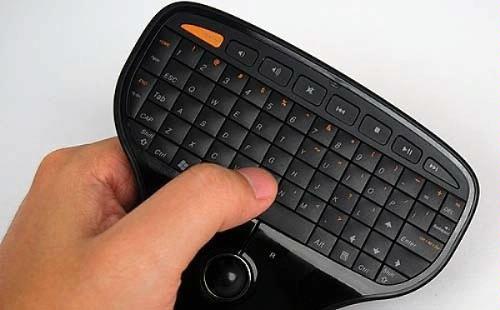
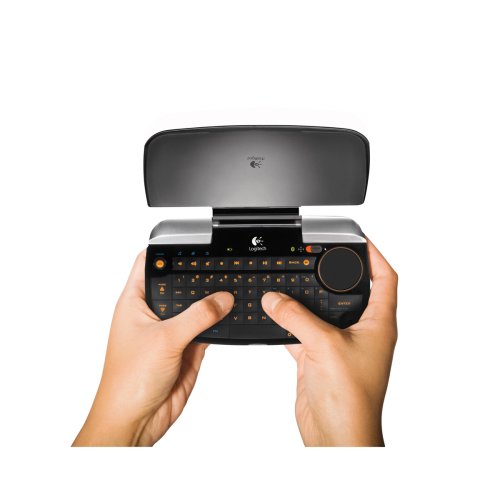
palm-sized wireless mouse & keyboard combination device(s)

A palm sized wireless mouse & keyboard combination would be great not only for our smart classroom instructor podiums, but also to accompany the large-ish "viewing screens" such as the one recently installed in Special Collections.

The following are three devices I've researched that may meet our needs:


Friday, October 1, 2010

Bluetooth Cordless Handheld Barcode Scanners for mobile inventory

This wireless handheld scanner would help to improve our roaming inventory process as well as the check in of new items. When connected to a mobile device, barcodes could be scanned directly into a web-based app or stored locally in a spreadsheet file for later transfer/upload to the inventory system.

Socket Mobile CHS Series 7  Bluetooth Cordless Handheld Barcode Scanners work with:
iPhone iOS 4, iPad, Blackberry, Palm, Windows Mobile, tabletPC and Windows7


Socket Mobile 7XRx iPad Demo  http://www.youtube.com/watch?v=eZqb99pAbEc


Socket Mobile iPhone iOS4 Demo http://www.youtube.com/watch?v=ImI_oqXICGk


They have several different models and features.
http://ww1.socketmobile.com/products/bluetooth-scanners.aspx

CDW carries models in $300-$500 range:
Socket Bluetooth Cordless Hand Scanner 7E - barcode scanner
Barcode scanner - handheld - 100 scan / sec - decoded - Bluetooth 2.1 EDR
MFG #: CX2858-1294   |   CDW #: 2190560
 Socket Mobile also makes PDA handhelds with fully integrated scanners & wifi that run WindowsMobile... http://www.socketmobile.com/products/


Thursday, December 17, 2009

Squirrel Mail becomes Nuts Mail

During December 2009, IDT is having the ROHAN server run Nuts Mail along side Squirrel Mail. This option is to give users a chance to test out the new version. IDT is switching ROHAN to Nuts Mail for the Spring 2010 semester and will turn off Squirrel Mail at the same time.

The switch will provide IDT with an easier way to manage the mail service updates, as well as give users some updated features and a modern interface. New features include the following options: To Do List, Notes, Bookmarks, and Calendar, as well as Help, Search, and Logout as small icons in the upper right corner of the screen.

Nuts Mail will use the same preferences users had saved in Squirrel Mail. However some stylesheets have changed colors, so be sure to go into Options > Display Preferences > and test out new Themes and Custom Stylesheets.

Wednesday, October 7, 2009

Problem with SSH Sessions on ROHAN

ROHAN is seeing TCP packet losses that are sometimes affecting SSH sessions causing the "keepalive" packets to be lost. This causes ROHAN to think the SSH client has gone away and ROHAN then closes the session.

TNS is able to duplicate the problem (ping packet losses and SSH sessions closing) and is investigating. Please let others know we are trying to solve this aggravating problem and thank you for your patience.

Wednesday, September 30, 2009

Browser Caching Tip on ROHAN

When changes are made to websites on ROHAN, it can take an hour for the modifications to show up on a refresh of the browser page. The reason is caching.

ROHAN sets expiration flags so HTML pages are cached 1 hour, and images for 1 week by the browser viewing the page. ROHAN's web server also keeps an internal memory cache of frequently served static objects. The server cache is refreshed every hour.

You can force the cache (both browser and web server) to update immediately by clicking reload in Firefox. Some browsers don't update cached items unless the SHIFT key is held down while clicking reload. NOTE: IE version 8 only refreshes it's cache if you hold down the CTRL key and click reload. SHIFT reload does not refresh in IE version 8.

Monday, September 21, 2009

ROHAN Streaming Media Server News

The planned move of Streaming Media services from the ROHAN server to the EOMER server for Spring 2010 semester use was announced at the September MWSSLS meeting. This change will happen one week prior to the Spring 2010 semester. The move solves the QuickTime streaming issues for off-campus users. The upload of files remains with ROHAN, as EOMER will just handle the serving of files.

Tuesday, September 15, 2009

Major change on www-rohan.sdsu.edu

After two months of working on the fine-tuning, Ron Nash switched the ROHAN web services over to a modified proxy server option for static content on Tuesday, September 8, 2009. Using Apache 2.13, www-rohan.sdsu.edu now has a lightweight and a heavyweight side to its web serving. The heavyweight side handles the more complicated php requests, while the lightweight side serves up the shorter text-based requests. This division of labor allows the text-based requests to be served approximately 10 times faster. The default refresh on content is set at one hour, while images are set at one week for their refresh. Kudos to Ron for the service improvement.

Monday, August 31, 2009

Netstorage is Unavailable

Please be aware that server access to ARWEN via Netstorage is unavailable right now. The problem symptom appears as a looping of the request for Authentication. The Server Administrator is aware of the problem and will be addressing it soon. This affects remote access to the User directory, as well as Share/IST_Binder directory for IDT Customer Resources and any forms that are stored on ARWEN. As soon as access can be restored, IDT will update customers. Thank you for your patience.

Thursday, August 27, 2009

IDT Backlog of Requests

Please be aware that IDT’s SANS workgroup is experiencing a backlog of work. Between office moves, vacations, paternity leaves, and furloughs, IDT has not had a full crew in several months. SANS has had 2 technicians some of the time, but mostly only 1 technician the majority of the time. The technicians are nearing the completion of the public image refresh and are beginning to address the backlog of requests. Their first priority will be broken equipment (workstations that don’t bootup, printers that don’t print, etc.). Once that is taken care of, they will address requests for changes to hardware and software. Getting there will take some time, so please bear with us. We appreciate and thank you for your patience.

Wednesday, August 26, 2009

Library ATI/Websites Report

As of 8/26/09, ROHAN's 10,538 web pages have 8,532 (81%) pages now receiving a passing grade on their ATI requirements. While Infodome 6,502 web pages have reached the 72% mark with 4,695 pages passing, SCUA web pages are just .2% (4 pages) away from the coveted 100% complete and Infoguides are at the finish line. Well done, Sandy Neer. Timeline for completion of the remaining pages is the end of Fall semester 2009 barring unforeseen issues.

Monday, August 24, 2009

Library Paid Printing now using GoPrint

The new GoPrint Paid Printing system installation in the Library offers a new look and feel at the release station for patrons and a completely distinct server administration back-end that promises to be more stable and manageable with additional flexibility for future growth and enhancement.

Kyle Murley, Brian Lenz, and Michael Dimaio are completing the deployment of the new GoPrint Paid Printing system in 24/7, Reference, CPMC, Media Center, and SCUA the week of August 17th. Four of the GoPrint release stations (Reference, and CPMC) are using Touch Screen monitor interface, while the printers in 24/7, SCUA and Media Center are using a mouse interface. Signage is up already explaining the Touch method with thanks to Copy Services. All GoPrint release stations are using the image that Steve Voelker built. Brian Lenz and Michael Dimaio imaged the CPUs, while Kyle Murley and Brian Lenz handled the installation setup. GOPRINT server administrators are Mark Figueroa, Brian Lenz and Dennis Shannon.

During Fall ’09 semester, the GoPrint project team will be working on adding Wireless printing to the GoPrint options with possible deployment by December.

Please note: SCC will continue to use the ITC Paid Printing system due to their current Novell setup, but will probably make the switch to GoPrint by Winter Break. Other campus departments will be changing to GoPrint by June 30, 2010, as the ITC contract for the previous system will end.

@SDSULibTech on Twitter